Sample continuous integration (CI) configurations
This document provides sample configuration snippets to run Semgrep CI on various continuous integration (CI) providers.
Feature support
Support for certain features of Semgrep AppSec Platform depend on your CI provider or source code management tool (SCM). The following table breaks down the features and their availability:
Integrations with source code providers, dependent on CI provider:
| Feature | GitHub with GitHub Actions | GitLab with GL CI/CD | GitHub, GitLab, or BitBucket with other CI providers |
|---|---|---|---|
| Diff-aware scanning | ✅ | ✅ | ✅ (May need additional set up) |
| Hyperlinks | ✅ | ✅ | ✅ (May need additional set up) |
| PR or MR comments | ✅ | ✅ | ✅ (May need additional set up) |
| SCM security dashboard | ✅ GitHub Advanced Security Dashboard | ✅ GitLab Security Dashboard | ❌ No |
For example, if you use CircleCI as your CI provider on a GitHub repository, Semgrep AppSec Platform does not have any support for GitHub Advanced Security Dashboard.
The following list defines the above features.
- Diff-aware scanning
- Semgrep AppSec Platform can scan only changes in files when running on a pull request or merge request (PR or MR). This keeps the scan fast and reduces finding duplication.
- Hyperlinks to code
- Semgrep AppSec Platform collects findings in a Findings page. In this page, you can click on a finding to return to your SCM (Github, GitLab, or Bitbucket) to view the lines of code in your repository that generated the finding.
- Receiving results (findings) as PR or MR comments
- This feature enables you to receive PR or MR comments from Semgrep AppSec Platform on the lines of code that generated a finding.
- SCM security dashboard
- Send Semgrep findings to your SCM's security dashboard.
GitHub Actions
To add a Semgrep configuration file in your GitHub Actions pipeline:
- Create a
semgrep.ymlfile in.github/workflowsin the repository you want to scan. - Copy the relevant code snippet provided in Sample GitHub Actions configuration file.
- Paste the relevant code snippet to
semgrep.ymlfile. This is your Semgrep configuration file for GitHub Actions. - Commit the configuration file under
/REPOSITORY-ROOT-DIRECTORY/.github/workflows/semgrep.yml. - The Semgrep job starts automatically upon detecting the committed
semgrep.ymlfile.
If you are self-hosting your repository, you must use a self-hosted runner.
Sample GitHub Actions configuration file
- Default
- Semgrep CE
The following configuration creates a CI job that runs scans using the products and options you have enabled in Semgrep AppSec Platform.
# Name of this GitHub Actions workflow.
name: Semgrep

on:
  # Scan changed files in PRs (diff-aware scanning):
  pull_request: {}
  # Scan on-demand through GitHub Actions interface:
  workflow_dispatch: {}
  # Scan mainline branches if there are changes to .github/workflows/semgrep.yml:
  push:
    branches:
      - main
      - master
    paths:
      - .github/workflows/semgrep.yml
  # Schedule the CI job (this method uses cron syntax):
  schedule:
    - cron: '20 17 * * *' # Sets Semgrep to scan every day at 17:20 UTC.
    # It is recommended to change the schedule to a random time.

permissions:
  contents: read

jobs:
  semgrep:
    # User definable name of this GitHub Actions job.
    name: semgrep/ci
    # If you are self-hosting, change the following `runs-on` value:
    runs-on: ubuntu-latest

    container:
      # A Docker image with Semgrep installed. Do not change this.
      image: semgrep/semgrep

    # Skip any PR created by dependabot to avoid permission issues:
    if: (github.actor != 'dependabot[bot]')

    steps:
      # Fetch project source with GitHub Actions Checkout. Use either v3 or v4.
      - uses: actions/checkout@v4
      # Run the "semgrep ci" command on the command line of the docker image.
      - run: semgrep ci
        env:
          # Connect to Semgrep AppSec Platform through your SEMGREP_APP_TOKEN.
          # Generate a token from Semgrep AppSec Platform > Settings
          # and add it to your GitHub secrets.
          SEMGREP_APP_TOKEN: ${{ secrets.SEMGREP_APP_TOKEN }}
You can run specific product scans by passing an argument, such as --supply-chain. View the list of arguments.
The following configuration creates a CI job that runs Semgrep Community Edition (CE) scans using rules configured for your programming language.
# Name of this GitHub Actions workflow.
name: Semgrep CE scan

on:
  # Scan in PRs:
  pull_request: {}
  # Scan on-demand through GitHub Actions interface:
  workflow_dispatch: {}
  # Scan mainline branches and report all findings:
  push:
    branches: ["master", "main"]
  # Schedule the CI job (this method uses cron syntax):
  schedule:
    - cron: '20 17 * * *' # Sets Semgrep to scan every day at 17:20 UTC.
    # It is recommended to change the schedule to a random time.

permissions:
  contents: read

jobs:
  semgrep:
    # User definable name of this GitHub Actions job.
    name: semgrep-oss/scan
    # If you are self-hosting, change the following `runs-on` value:
    runs-on: ubuntu-latest

    container:
      # A Docker image with Semgrep installed. Do not change this.
      image: semgrep/semgrep

    # Skip any PR created by dependabot to avoid permission issues:
    if: (github.actor != 'dependabot[bot]')

    steps:
      # Fetch project source with GitHub Actions Checkout. Use either v3 or v4.
      - uses: actions/checkout@v4
      # Run the "semgrep scan" command on the command line of the docker image.
      - run: semgrep scan --config auto
You can customize the scan by entering custom rules or other rulesets to scan with. See Scan your codebase with a specific ruleset.
If you define both branches or branches-ignore and paths or paths-ignore, the workflow only runs when both filters are satisfied.
For example, if your configuration file includes the following definition, the workflow runs only if there are changes on the development branch to .github/workflows/semgrep.yml :
push:
  branches:
    - development
  paths:
    - .github/workflows/semgrep.yml
Upload findings to GitHub Advanced Security Dashboard
Alternate job that uploads findings to GitHub Advanced Security Dashboard
# Name of this GitHub Actions workflow.
name: Semgrep

on:
  # Scan changed files in PRs (diff-aware scanning):
  pull_request: {}
  # Scan on-demand through GitHub Actions interface:
  workflow_dispatch: {}
  # Scan mainline branches and report all findings:
  push:
    branches: ["master", "main"]
  # Schedule the CI job (this method uses cron syntax):
  schedule:
    - cron: '20 17 * * *' # Sets Semgrep to scan every day at 17:20 UTC.
    # It is recommended to change the schedule to a random time.

permissions:
  # This permission is required when uploading sarifs to any repository at GitHub
  security-events: write
  # These permissions are only required when uploading sarifs to private and internal repositories at GitHub
  contents: read
  actions: read

jobs:
  semgrep:
    # User definable name of this GitHub Actions job.
    name: semgrep/ci
    # If you are self-hosting, change the following `runs-on` value:
    runs-on: ubuntu-latest

    container:
      # A Docker image with Semgrep installed. Do not change this.
      image: semgrep/semgrep

    # Skip any PR created by dependabot to avoid permission issues:
    if: (github.actor != 'dependabot[bot]')

    steps:
      # Fetch project source with GitHub Actions Checkout. Use either v3 or v4.
      - uses: actions/checkout@v4
      # Run the "semgrep ci" command on the command line of the docker image.
      - run: semgrep ci --sarif > semgrep.sarif
        env:
          # Connect to Semgrep AppSec Platform through your SEMGREP_APP_TOKEN.
          # Generate a token from Semgrep AppSec Platform > Settings
          # and add it to your GitHub secrets.
          SEMGREP_APP_TOKEN: ${{ secrets.SEMGREP_APP_TOKEN }}

      - name: Upload SARIF file for GitHub Advanced Security Dashboard
        uses: github/codeql-action/upload-sarif@v3
        with:
          sarif_file: semgrep.sarif
        if: always()
GitLab CI/CD
To add a Semgrep configuration snippet in your GitLab CI/CD pipeline:
- Create or edit your
.gitlab-ci.ymlfile in the repository you want to scan. - Copy the relevant code snippet provided in Sample GitLab CI/CD configuration snippet, and then paste it to your
.gitlab-ci.ymlfile. - Commit the updated
.gitlab-ci.ymlfile. - The Semgrep job starts automatically upon detecting the committed
.gitlab-ci.ymlfile. You can also view the job from your GitLab project's CI/CD > Pipelines page.
Sample GitLab CI/CD configuration snippet
- Default
- Semgrep CE
The following configuration creates a CI job that runs scans using the products and options you have enabled in Semgrep AppSec Platform.
semgrep:
  # A Docker image with Semgrep installed.
  image: semgrep/semgrep
  # Run the "semgrep ci" command on the command line of the docker image.
  script: semgrep ci

  rules:
    # Allow triggering a scan manually from the GitLab UI
    - if: $CI_PIPELINE_SOURCE == "web"
    # Scan changed files in MRs, (diff-aware scanning):
    - if: $CI_MERGE_REQUEST_IID
    # Scan mainline (default) branches and report all findings.
    - if: $CI_COMMIT_BRANCH == $CI_DEFAULT_BRANCH

  variables:
    # Connect to Semgrep AppSec Platform through your SEMGREP_APP_TOKEN.
    # Generate a token from Semgrep AppSec Platform > Settings
    # and add it as a variable in your GitLab CI/CD project settings.
    SEMGREP_APP_TOKEN: $SEMGREP_APP_TOKEN
You can run specific product scans by passing an argument, such as --supply-chain. View the list of arguments.
Prefer to use GitLab group variables? See this guide for an appropriate configuration.
The following configuration creates a CI job that runs Semgrep CE scans using rules configured for your programming language.
semgrep:
  # A Docker image with Semgrep installed.
  image: semgrep/semgrep
  # Run the "semgrep scan" command on the command line of the docker image.
  script: semgrep scan --config auto .

  rules:
  # Scan in MRs.
  - if: $CI_MERGE_REQUEST_IID

  # Scan mainline (default) branches and report all findings.
  - if: $CI_COMMIT_BRANCH == $CI_DEFAULT_BRANCH
You can customize the scan by entering custom rules or other rulesets to scan with. See Scan your codebase with a specific ruleset.
Upload findings to GitLab Security Dashboard
Alternate job that uploads SAST findings to GitLab Security Dashboard
semgrep:
  # A Docker image with Semgrep installed.
  image: semgrep/semgrep

  rules:
    # Scan changed files in MRs, (diff-aware scanning):
    - if: $CI_MERGE_REQUEST_IID

    # Scan mainline (default) branches and report all findings.
    - if: $CI_COMMIT_BRANCH == $CI_DEFAULT_BRANCH

  variables:
    # Connect to Semgrep AppSec Platform through your SEMGREP_APP_TOKEN.
    # Generate a token from Semgrep AppSec Platform > Settings
    # and add it as a variable in your GitLab CI/CD project settings.
    SEMGREP_APP_TOKEN: $SEMGREP_APP_TOKEN

    # Upload findings to GitLab SAST Dashboard:
    SEMGREP_GITLAB_JSON: "1"

  # Run the "semgrep ci" command on the command line of the docker image and send findings
  # to GitLab SAST.
  script: semgrep ci --code --gitlab-sast > gl-sast-report.json || true
  artifacts:
    reports:
      sast: gl-sast-report.json
Jenkins
Your UI (user interface) may vary depending on your Jenkins installation. These steps use a Classic UI Jenkins interface.
To add a Semgrep configuration snippet in your Jenkins pipeline:
- Create or edit your
Jenkinsfileconfiguration file in the repository you want to scan. You can also edit yourJenkinsfilefrom Jenkins's interface. - Copy the relevant code snippet provided in Sample Jenkins configuration snippet.
- Paste the code to your
Jenkinsfile, and then commit the file. - The Semgrep job starts automatically upon detecting the
Jenkinsfileupdate. - Optional: Create a separate CI job for diff-aware scanning, which scans only changed files in PRs or MRs, by repeating steps 1-3 and uncommenting the
SEMGREP_BASELINE_REFdefinition provided within the code snippet.
Sample Jenkins configuration snippet
- Default
- Semgrep CE
- Default (Docker)
- Default (Bitbucket Data Center)
For SCA scans (Semgrep Supply Chain): users of Jenkins UI with the Git plugin must also set up their branch information. See Setting up Semgrep Supply Chain with Jenkins UI for more information.
The following configuration creates a CI job that runs scans using the products and options you have enabled in Semgrep AppSec Platform.
This code snippet uses Jenkins declarative syntax.
pipeline {
  agent any
    environment {
      // The following variable is required for a Semgrep AppSec Platform-connected scan:
      SEMGREP_APP_TOKEN = credentials('SEMGREP_APP_TOKEN')

      // Uncomment the following line to scan changed
      // files in PRs or MRs (diff-aware scanning):
      // SEMGREP_BASELINE_REF = "main"

      // Troubleshooting:

      // Uncomment the following lines if Semgrep AppSec Platform > Findings Page does not create links
      // to the code that generated a finding or if you are not receiving PR or MR comments.
      // SEMGREP_JOB_URL = "${BUILD_URL}"
      // SEMGREP_COMMIT = "${GIT_COMMIT}"
      // SEMGREP_BRANCH = "${GIT_BRANCH}"
      // SEMGREP_REPO_NAME = env.GIT_URL.replaceFirst(/^https:\/\/github.com\/(.*).git$/, '$1')
      // SEMGREP_REPO_URL = env.GIT_URL.replaceFirst(/^(.*).git$/,'$1')
      // SEMGREP_PR_ID = "${env.CHANGE_ID}"
    }
    stages {
      stage('Semgrep-Scan') {
        steps {
          sh 'pip3 install semgrep'
          sh 'semgrep ci'
      }
    }
  }
}
You can run specific product scans by passing an argument, such as --supply-chain. View the list of arguments.
The following configuration creates a CI job that runs Semgrep CE scans using rules configured for your programming language.
This code snippet uses Jenkins declarative syntax.
pipeline {
  agent any
    stages {
      stage('Semgrep-Scan') {
        steps {
          sh 'pip3 install semgrep'
          sh 'semgrep scan --config auto'
      }
    }
  }
}
You can customize the scan by entering custom rules or other rulesets to scan with. See Scan your codebase with a specific ruleset.
This code snippet uses Jenkins declarative syntax.
pipeline {
  agent any
    environment {
      // The following variable is required for a Semgrep AppSec Platform-connected scan:
      SEMGREP_APP_TOKEN = credentials('SEMGREP_APP_TOKEN')

      // Uncomment the following line to scan changed
      // files in PRs or MRs (diff-aware scanning):
      // SEMGREP_BASELINE_REF = "main"

      // Troubleshooting:

      // Uncomment the following lines if Semgrep AppSec Platform > Findings Page does not create links
      // to the code that generated a finding or if you are not receiving PR or MR comments.
      // SEMGREP_JOB_URL = "${BUILD_URL}"
      // SEMGREP_COMMIT = "${GIT_COMMIT}"
      // SEMGREP_BRANCH = "${GIT_BRANCH}"
      // SEMGREP_REPO_NAME = env.GIT_URL.replaceFirst(/^https:\/\/github.com\/(.*).git$/, '$1')
      // SEMGREP_REPO_URL = env.GIT_URL.replaceFirst(/^(.*).git$/,'$1')
      // SEMGREP_PR_ID = "${env.CHANGE_ID}"
    }
    stages {
      stage('Semgrep-Scan') {
        steps {
            sh '''docker pull semgrep/semgrep && \
            docker run \
            -e SEMGREP_APP_TOKEN=$SEMGREP_APP_TOKEN \
            -e SEMGREP_REPO_URL=$SEMGREP_REPO_URL \
            -e SEMGREP_REPO_NAME=$SEMGREP_REPO_NAME \
            -e SEMGREP_BRANCH=$SEMGREP_BRANCH \
            -e SEMGREP_COMMIT=$SEMGREP_COMMIT \
            -e SEMGREP_PR_ID=$SEMGREP_PR_ID \
            -v "$(pwd):$(pwd)" --workdir $(pwd) \
            semgrep/semgrep semgrep ci '''
      }
    }
  }
}
The following configuration creates a CI job that runs scans depending on what products you have enabled in Semgrep AppSec Platform. It is for use with code hosted in Bitbucket Data Center.
This code snippet uses Jenkins declarative syntax.
pipeline {
  agent any
    environment {
      // The following variable is required for a Semgrep AppSec Platform-connected scan:
      SEMGREP_APP_TOKEN = credentials('SEMGREP_APP_TOKEN')
      BITBUCKET_TOKEN = credentials('FS_BITBUCKET_TOKEN')

      // Uncomment the following line to scan changed
      // files in PRs or MRs (diff-aware scanning):
      // SEMGREP_BASELINE_REF = "${env.CHANGE_ID != null ? 'main' : ''}"

      // Troubleshooting:

      // Uncomment the following lines if Semgrep AppSec Platform > Findings Page does not create links
      // to the code that generated a finding or if you are not receiving PR or MR comments.
      // SEMGREP_JOB_URL = "${BUILD_URL}"
      // SEMGREP_COMMIT = "${GIT_COMMIT}"
      // SEMGREP_BRANCH = "${GIT_BRANCH}"
      // SEMGREP_REPO_NAME = env.GIT_URL.replaceFirst(/^https:\/\/YOUR_BITBUCKET_DATA_CENTER_URL\/scm\/(.*).git$/, '$1')
      // SEMGREP_REPO_URL = env.GIT_URL.replaceFirst(/^(https:\/\/.*?)\/scm\/(.*)\/(.*)\.git$/, '$1/projects/$2/repos/$3')
      // SEMGREP_PR_ID = "${env.CHANGE_ID != null ? env.CHANGE_ID : ''}"
      SEMGREP_APP_URL = "https://semgrep.dev"
    }
    stages {
      stage('Semgrep-Scan') {
        steps {
            sh 'pip3 install semgrep'
            sh 'semgrep ci'
        }
    }
  }
}
Bitbucket Pipelines
To add a Semgrep configuration snippet into Bitbucket Pipelines:
- Create or edit your
bitbucket-pipelines.ymlfile in the repository you want to scan. - Copy the relevant code snippet provided in Sample Bitbucket Pipelines configuration snippet, and then paste it to your
bitbucket-pipelines.yml. - Commit the updated
bitbucket-pipelines.ymlconfiguration file. - The Semgrep job starts automatically upon detecting the committed
bitbucket-pipelines.ymlfile. You can view the job through Bitbucket's interface, by clicking REPOSITORY_NAME > Pipelines. - Optional: Create a daily scheduled run for the custom pipeline on the main branch by scheduling a pipeline in Bitbucket.
These steps can also be performed through Bitbucket's UI wizard. This UI wizard can be accessed through Bitbucket > REPOSITORY_NAME > Pipelines > Create your first pipeline.
Sample Bitbucket Pipelines configuration snippet
- Default
- Semgrep CE
The following configuration creates a CI job that runs scans using the products and options you have enabled in Semgrep AppSec Platform.
image: semgrep/semgrep:latest

pipelines:
  branches:
    # Change to your default branch if different from main
    main:
    - step:
        name: Semgrep scan on push
        script:
          - export SEMGREP_APP_TOKEN=$SEMGREP_APP_TOKEN
          - semgrep ci

  pull-requests:
    '**': # This applies to pull requests for all branches
      - step:
          name: Semgrep scan on PR
          script:
            - export SEMGREP_APP_TOKEN=$SEMGREP_APP_TOKEN
            - export BITBUCKET_TOKEN=$PAT # Necessary for PR comments
            # Change to your default branch if different from main
            - export SEMGREP_BASELINE_REF="origin/main"
            - git fetch origin "+refs/heads/*:refs/remotes/origin/*"
            - semgrep ci

  custom:
  # Trigger job manually. For cron in Bitbucket, see: https://support.atlassian.com/bitbucket-cloud/docs/pipeline-triggers/#On-schedule
    semgrep-manual:
      - step:
          name: Semgrep manual scan
          script:
            - export SEMGREP_APP_TOKEN=$SEMGREP_APP_TOKEN
            - semgrep ci
You can run specific product scans by passing an argument, such as --supply-chain. View the list of arguments.
The following configuration creates a CI job that runs Semgrep CE scans using rules configured for your programming language.
image: semgrep/semgrep:latest

pipelines:
  default:
    - parallel:
      - step:
          name: 'Run Semgrep scan with current branch'
          deployment: dev # https://support.atlassian.com/bitbucket-cloud/docs/set-up-and-monitor-deployments/
          script:
            - semgrep scan --config auto
You can customize the scan by entering custom rules or other rulesets to scan with. See Scan your codebase with a specific ruleset.
If the pipeline's default runner runs out of memory, you can limit the number of subprocesses Semgrep uses with the -j flag, or add the size directive to the Semgrep step to increase the memory available:
pipelines:
  default:
    - step:
        size: 2x
        script:
          - echo "This step gets double the memory!"
Buildkite
To add Semgrep into your Buildkite pipeline:
- Prepare a configuration file to add a Semgrep scan as part of your pipeline. This configuration file can be stored within Buildkite or as a
pipeline.ymlfile in the target repository. - Copy the code snippet provided in Sample Buildkite configuration snippet, making alterations if necessary for your environment.
- If you are using Buildkite to store the configuration, save the updated file. Otherwise, commit the updated
pipeline.ymlfile into the/.buildkitefolder within the target repository. - The Semgrep job starts automatically upon detecting the committed
pipeline.ymlfile. Alternatively, if you are using the Buildkite UI, you can select New build. You can view the job through Buildkite's interface by clicking Pipelines > pipeline name.
These steps can be performed within Buildkite's UI. To do so, navigate to Buildkite's main page, and click Pipelines > New Pipeline.
Sample Buildkite configuration snippet
- Default
- Semgrep CE
The following configuration creates a CI job that runs scans according to the products you have enabled in Semgrep AppSec Platform. The provided environment variables are commonly needed to correctly configure scans from Buildkite.
This file configures two mutually exclusive command steps, one for full scans, and one for diff-aware scans. The latter is used for pull requests or merge requests.
In order for this configuration to run the correct type of scan for each condition, it requires both branch filtering and configuration to build on pull requests.
Branch filtering
- In the Buildkite UI, go to the pipeline Settings and select the connected source code manager in the left sidebar.
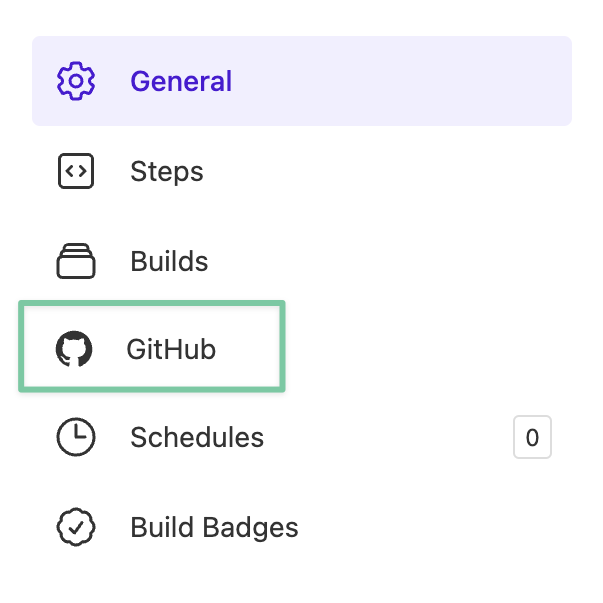 Figure. Buildkite pipeline settings with using GitHub as the SCM.
 - Under Branch Limiting, enter your default branch name in the Branch Filter Pattern box. You can include any other branch names that require full scans as well, such as
release-*.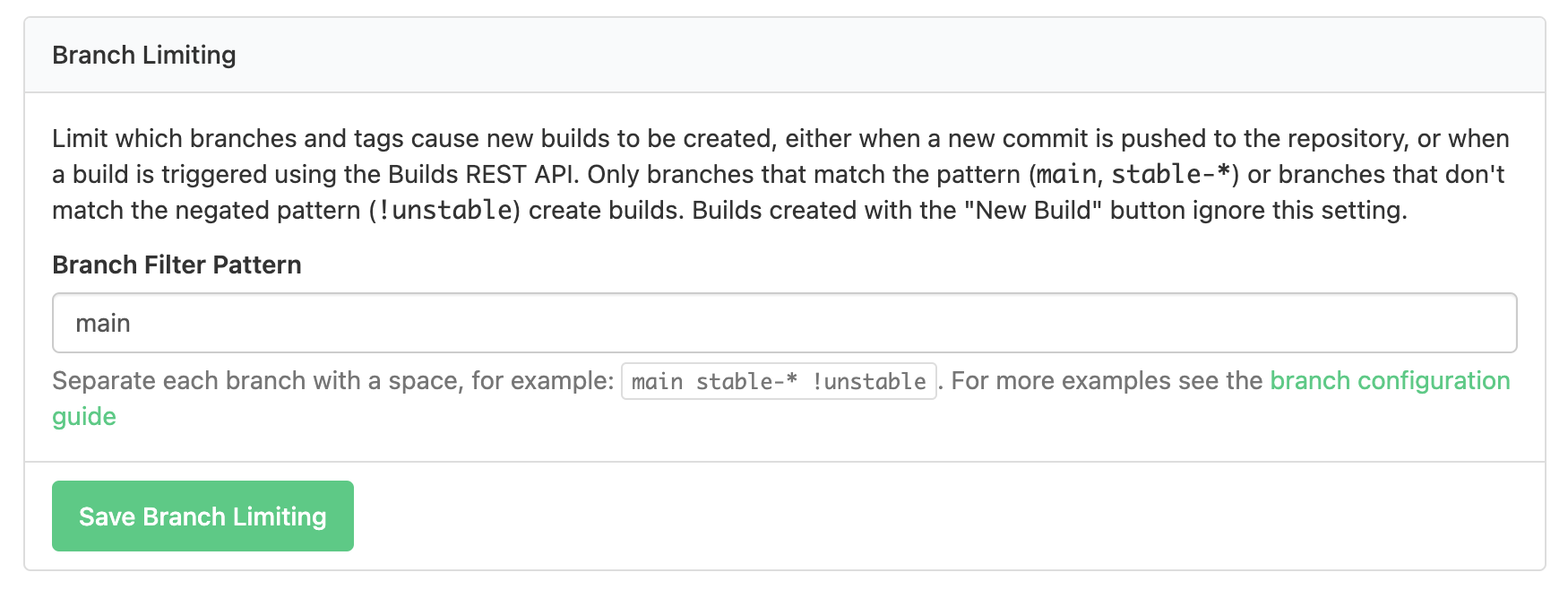 Figure. Branch limiting settings with main as the example branch.
 - Click Save Branch Limiting.
Build on pull requests
To run diff-aware scans, your pipeline must run builds on pull requests or merge requests. Buildkite integrates with several source code managers and each one has different options to handle PRs or MRs. The most common options are a checkbox within the pipeline settings, or webhooks within the source control manager. Review the documentation for your source control system to ensure your Semgrep pipeline builds on pull requests or merge requests.
- label: ":semgrep: Semgrep Full Scan"
  commands:
    - if [[ $BUILDKITE_COMMIT =~ ^[a-fA-F0-9]{40}$ ]]; then export SEMGREP_COMMIT=${BUILDKITE_COMMIT}; fi
    - export SEMGREP_BRANCH=${BUILDKITE_BRANCH}
    - export SEMGREP_REPO_URL=${BUILDKITE_REPO}
    - export SEMGREP_REPO_NAME="$(echo "$BUILDKITE_REPO" | sed -e 's#git@github.com:##' | sed -e 's#.git##')"
    - semgrep ci
  if: |
    build.pull_request.id == null

- label: ":semgrep: Semgrep Diff Scan"
  commands:
    - if [[ $BUILDKITE_COMMIT =~ ^[a-fA-F0-9]{40}$ ]]; then export SEMGREP_COMMIT=${BUILDKITE_COMMIT}; fi
    - export SEMGREP_PR_ID=${BUILDKITE_PULL_REQUEST}
    - export SEMGREP_BRANCH=${BUILDKITE_BRANCH}
    - export SEMGREP_REPO_URL=${BUILDKITE_REPO}
    - export SEMGREP_REPO_NAME="$(echo "$BUILDKITE_REPO" | sed -e 's#git@github.com:##' | sed -e 's#.git##')"
    - SEMGREP_BASELINE_REF=${BUILDKITE_PULL_REQUEST_BASE_BRANCH} semgrep ci
  if: |
    build.pull_request.id != null

  plugins:
    - docker#v5.11.0:
        image: semgrep/semgrep:latest
        environment:
          # The following variable is required to set up a scan connected to Semgrep AppSec Platform:
          - "SEMGREP_APP_TOKEN"
You can run specific product scans by passing the appropriate argument, such as --supply-chain.
The following configuration creates a CI job that runs Semgrep CE scans using rules configured for your programming language.
- label: ":semgrep: Semgrep CE"
  commands:
    - semgrep scan --config auto
  plugins:
    - docker#v5.11.0:
        image: semgrep/semgrep
You can customize the scan by entering custom rules or other rulesets to scan with. See Scan your codebase with a specific ruleset.
CircleCI
To add Semgrep into your CircleCI pipeline:
- Create a context:
- In CircleCI web app, click Organization Settings > Contexts.
- Click Create Context.
- Enter
semgrepas the name for the context. - Click Add Environment Variable and enter your
SEMGREP_APP_TOKEN.
- Create or edit your
config.ymlconfiguration file in the repository you want to scan. - Copy the relevant code snippet provided in Sample CircleCI configuration snippet.
- If your default branch is not
main, change the occurrences ofmainto the name of your default branch. - Commit the updated
config.ymlconfiguration file into the/.circlecifolder in the target repository. - The Semgrep job starts automatically upon detecting the
config.ymlupdate.
The sample configuration provides jobs for both full scanning and diff-aware scanning, which scans only changed files in PRs or MRs. You do not need to create any other jobs.
CircleCI runs the Semgrep job on all the commits for the project by default. If you want the job to scan only branches that have an associated a pull request open, you can enable the option "Only build pull requests" in Project Settings > Advanced.
For the default branch and tags, CircleCI always runs the Semgrep CI job on all commits.
Sample CircleCI configuration snippet
- Default
- Semgrep CE
The following configuration creates a CI job that runs scans using the products and options you have enabled in Semgrep AppSec Platform.
version: 2.1
workflows:
  semgrep:
    jobs:
      - semgrep-full-scan:
          filters:
            branches:
              only: main
          context:
            - semgrep
      - semgrep-diff-scan:
          filters:
            branches:
              ignore: main
          context:
            - semgrep
jobs:
  semgrep-full-scan:
    docker:
      - image: semgrep/semgrep
    steps:
      - checkout
      - run:
          name: "Semgrep full scan"
          command: semgrep ci
  semgrep-diff-scan:
    parameters:
      default_branch:
        type: string
        default: main
    docker:
      - image: semgrep/semgrep
    steps:
      - checkout
      - run:
          name: Semgrep diff scan
          environment:
            SEMGREP_BASELINE_REF: << parameters.default_branch >>
          command: semgrep ci
You can run specific product scans by passing an argument, such as --supply-chain. View the list of arguments.
The following configuration creates a CI job that runs Semgrep CE scans using rules configured for your programming language.
version: 2.1
workflows:
  semgrep:
    jobs:
      - semgrep-full-scan:
          filters:
            branches:
              only: main
          context:
            - semgrep
jobs:
  semgrep-full-scan:
    docker:
      - image: semgrep/semgrep
    steps:
      - checkout
      - run:
          name: "Semgrep CE full scan"
          command: semgrep scan --config auto
You can customize the scan by entering custom rules or other rulesets to scan with. See Scan your codebase with a specific ruleset.
Azure Pipelines
Scanning a project with the semgrep ci command requires the project to be version-controlled by Git. If you have Azure Repos that are version-controlled with Team Foundations Version Control, they must be migrated to Git to be scanned with semgrep ci and have results reported to the Semgrep AppSec Platform.
To add Semgrep into Azure Pipelines:
- Access the YAML pipeline editor within Azure Pipelines by following the YAML pipeline editor guide.
- Copy the code snippet provided in Sample Azure Pipelines configuration snippet into the Azure Pipelines YAML editor.
- Save the code snippet.
- Follow any additional instructions provided with the snippet.
Sample Azure Pipelines configuration snippet
This configuration snippet is tested with hosted Azure runners. If you are using self-hosted runners, you may need to make adjustments to ensure that the necessary software is available. Consult Semgrep with self-hosted Ubuntu runners in Azure Pipelines for two recommended options.
- Default
- Semgrep CE
The following configuration creates a CI job that runs scans using the products and options you have enabled in Semgrep AppSec Platform.
variables:
- group: Semgrep_Variables

steps:
- checkout: self
  clean: true
  fetchDepth: 20
  persistCredentials: true
- script: |
    python -m pip install --upgrade pip
    pip install semgrep
    if [ $(Build.SourceBranchName) = "master" ]; then
        echo "Semgrep full scan"
        semgrep ci
    elif [ $(System.PullRequest.PullRequestId) -ge 0 ]; then
        echo "Semgrep diff scan"
        export SEMGREP_PR_ID=$(System.PullRequest.PullRequestId)
        export SEMGREP_BASELINE_REF='origin/master'
        git fetch origin master:origin/master
        semgrep ci
    fi
  env:
    SEMGREP_APP_TOKEN: $(SEMGREP_APP_TOKEN)
You can run specific product scans by passing an argument, such as --supply-chain. View the list of arguments.
Set environment variables in Azure Pipelines
Semgrep minimally requires the variable SEMGREP_APP_TOKEN in order to report results to the platform, and other variables may be helpful as well. To set these variables in Azure Pipelines:
- Set up a variable group called
Semgrep_Variables. - Set
SEMGREP_APP_TOKENin the variable group, following the steps for secret variables. The variable is mapped into theenvin the provided config. - Optional: Add the following environment variables to the group if you aren't seeing hyperlinks to the code that generated a finding, or if you are not receiving PR or MR comments. Review the use of these variables at Environment variables for creating hyperlinks in Semgrep AppSec Platform.These variables are not sensitive and do not need to be secret variables.
SEMGREP_REPO_NAMESEMGREP_REPO_URLSEMGREP_BRANCHSEMGREP_COMMITSEMGREP_JOB_URL
- Set variables for diff-aware scanning. The provided config sets
SEMGREP_PR_IDto the system variableSystem.PullRequest.PullRequestIdandSEMGREP_BASELINE_REFtoorigin/masterwithin thescriptsection of the config. The value ofSEMGREP_BASELINE_REFis typically your trunk or default branch, so if you use a different branch than master, update the name accordingly. asmainormaster.- If you prefer not to implement diff-aware scanning, you can skip setting these variables and remove the
elifsection of thescriptstep.
- If you prefer not to implement diff-aware scanning, you can skip setting these variables and remove the
- For diff-aware scans: add a build validation policy. Adding and enabling a branch policy for build validation is required to trigger Azure Pipelines on pull requests.
The following configuration creates a CI job that runs Semgrep CE scans using rules configured for your programming language.
steps:
- checkout: self
  clean: true
  fetchDepth: 20
  persistCredentials: true
- script: |
    python -m pip install --upgrade pip
    pip install semgrep
    echo "Semgrep CE full scan"
    semgrep scan --config auto
You can customize the scan by entering custom rules or other rulesets to scan with. See Scan your codebase with a specific ruleset.
Semaphore
To add Semgrep into Semaphore:
-
Open the YAML pipeline for your project using the Visual Editor.
-
Click +Add Block.
-
Expand Jobs, and add the following commands to perform a full scan:
checkout
sudo pip install semgrep
semgrep ci -
Enable the secret that you created in Step 1. To do this, expand Secret, and select
SEMGREP_APP_TOKEN. -
Click Run the workflow, provide a Commit summary, and click Looks good, Start to save your changes and run the pipeline job.
Sample Semaphore configuration snippet
- Default
- Semgrep CE
The following configuration creates a CI job that runs scans using the products and options you have enabled in Semgrep AppSec Platform.
version: v1.0
name: Semaphore Semgrep Example
agent:
  machine:
    type: f1-standard-2
    os_image: ubuntu2204
blocks:
  - name: Semgrep
    task:
      jobs:
        # Job performing a full scan
        - name: Semgrep Full Scan
          commands:
            - checkout
            - sudo pip install semgrep
            - semgrep ci
        # Job performing a diff scan for PR/branches
        - name: Semgrep Diff-aware Scan
          commands:
            - checkout
            - export SEMGREP_BRANCH=$SEMAPHORE_GIT_BRANCH
            - export SEMGREP_BASELINE_COMMIT=$SEMAPHORE_GIT_SHA
            - sudo pip install semgrep
            - semgrep ci
      # import a secret named 'semgrep' with the SEMGREP_APP_TOKEN
      secrets:
        - name: SEMGREP_APP_TOKEN
You can run specific product scans by passing an argument, such as --supply-chain. View the list of arguments.
The following configuration creates a CI job that runs Semgrep CE scans using rules configured for your programming language.
version: v1.0
name: Semaphore Semgrep CE Example
agent:
  machine:
    type: f1-standard-2
    os_image: ubuntu2204
blocks:
  - name: Semgrep
    task:
      jobs:
        # Job performing a full scan using Semgrep CE
        - name: Semgrep CE Scan
          commands:
            - checkout
            - sudo pip install semgrep
            - semgrep scan
You can customize the scan by entering custom rules or other rulesets to scan with. See Scan your codebase with a specific ruleset.
Other providers
To run Semgrep CI on any other provider, use the semgrep/semgrep image, and run the semgrep ci command with SEMGREP_BASELINE_REF set for diff-aware scanning.
Note: If you need to use a different Docker image or are not running in Docker, install Semgrep CI by pip install semgrep. If you see an error during the installation process due to your Python environment being externally managed by a package manager, see Semgrep's article for instructions on how to proceed.
By setting various CI environment variables, you can run Semgrep in the following CI providers:
- AppVeyor
- Bamboo
- Bitrise
- Buildbot
- Codeship
- Codefresh
- Drone CI
- TeamCity CI
- Travis CI
Is your CI provider missing? Let the Semgrep team know by filing an issue, or submit a contribution.
Not finding what you need in this doc? Ask questions in our Community Slack group, or see Support for other ways to get help.